zMed Data Export API Manual
zMed API User Manual
Table of Contents
- zMed API User Manual
- Table of Contents
- Roles
- Rate Limiting
- Authentication and Access Management
- Account APIs
- Query APIs
- Error codes
- General Errors
- Role-based access
- Authentication
- Rate Limiters
- All patients query API
- Forms query API
- Device Data - Monitor query API
- Device Data - Anesthesia/Ventilator query API
- Lab Report query API
- ICE elements query API
- Progress notes query API
- Fluid Balance query API
- OT Anesthesia query API
- Ambulance GPS query API
- Public Schema
Roles
The api provides features to give role-based access to the users.
The roles are identified by numbers and the users can give any combination of these roles to the various users depending on their requirements.
In case the user tries to access which outside of its role, it will be responsed with a status code of
403along with a message indicating that the user is not allowed to access that resource. For example, if the user is not allowed to make queries, it will be responded with the following response:1 2 3 4
{ "message": "You are not allowed to query patient data.", "userRoles": [] // the list of roles that are allowed }
The following table shows the roles available, their corresponding number codes, and the corresponding error messages in case of authorized access:
| Role | Code | Unauthorized Access message |
|---|---|---|
| Change password for self | 0 | You are not allowed to change your password |
| Change password for a user | 1 | You are not allowed to change your password for this user |
| Logout of all devices | 2 | You are not allowed to logout from all devices |
| View size of data queried for self | 3 | You are not allowed to view the total data queried |
| View size of data queried for other users | 4 | You are not allowed to view the total data queried for that user |
| View rate-limits for self | 5 | You are not allowed to view the rate limits set for you |
| View rate-limits for other users | 6 | You are not allowed to view the rate limits set for that user |
| Queries | 7 | You are not allowed to query patient data |
| Change roles for a user (including self) | 8 | You are not allowed to change roles for users |
For example, a user will have the roles [0, 7] if the user can change password for its own account and make queries.
Note: Adding, removing users, setting, changing the rate limits can only be done by the zMed in this case.
Rate Limiting
To prevent the servers from getting spammed, users can enable rate limiting for each user. There are 4 different rate limiters available (based on the basis):
- User id
- Session id
- IP address
- Data size (in bytes)
Individual users can have any combination (including all the 4) types of rate limits.
For a given type of rate limiter, the user can have different layers of rate limiting too (For example,
15 requests per secondand100 requests per minutefor the user id rate limiter).The values number of requests and the unit of time for a given layer of a specified rate limiter can also be different for different users.
Disabling a specified type of rate limiter means no checks will be done for that basis.
Authentication and Access Management
- There are 4 apis for access management:
- Login
- Generate new access token
- Logout
- Logout for all users
- Change password for other users
- Change password for self
- Update roles for users
Token-based authentication
- Authentication will be done using refresh and access tokens.
- Both the tokens will be issued after the user successfully logs in.
- Access tokens are short-lived credentials that are used to access protected resources on behalf of a user.
- Access tokens are sent with each API request as Bearer tokens in the request headers to authenticate the user.
- When the access token expires, the user is required to obtain a new one by re-authenticating with their credentials.
- Refresh tokens are long-lived credentials that are used to obtain new access tokens without requiring the user to re-enter their credentials.
- Refresh tokens should be stored securely, in a secure HTTP-only cookie.
- Refresh tokens should not be accessibile to the application code.
- When an access token expires, the client can send the refresh token to the authentication server to request a new access token.
Authentication workflow
- The user logs in with their credentials (username/password in this case).
- The authentication server validates the credentials and, if successful, issues an access token and a refresh token.
- The access token is sent along with the API response, while the refresh token is sent as an HTTP-only cookie.
- When the access token expires, the resource server returns an authentication error.
- The client (application) detects the expired access token and uses the refresh token to request a new access token from the authentication server. In case, the client has cookies disabled, the user will be required to log in again.
- The authentication server validates the refresh token and issues a new access token.
- The new access token is then used for subsequent API requests, and the process repeats as needed until the refresh token itself expires.
- Once the refresh token expires, the user is required to log in again to obtain new tokens.
- While logging out, the authentication server removes the refresh token from the cookie as well as the database, but it will be the responsibility of the client to delete the access token.
- Users also have the ability to logout of all devices if they believe their tokens are leaked (subject to the relevant role).
Login
- Method:
POST - Base URL:
/api/v1/auth - Authentication required:
false - Request body
| Params | Description | Comments | Sample |
|---|---|---|---|
username | username of the authenticated user | required | user1 or user2@xyz.in |
password | password of the authenticated user | required |
- Reponse format
| Parameter | Description | Data type |
|---|---|---|
message | description of the response | string |
accessToken | access token which should be added as the Bearer token the request headers for subsequent requests | string |
Sample request url:
/api/v1/auth/loginSample response:
1
2
3
4
{
  "message": "User logged in successfully",
  "accessToken": "eyJskdnwdkmlw802..."
}
(Note: In addition to the response, this API also sets a httpOnly cookie zid on the client which can be used to generate access tokens)
Generate Access Token API
- Method:
GET - Base URL:
/api/v1/auth/generate-access-token - Authentication required:
partially(need to have a valid refresh token in the request cookies)
Logout API
- Method:
POST - Base URL:
/api/v1/auth/logout - Authentication required:
true Sample request url:
/api/v1/auth/logoutSample response:
1
2
3
{
  "message": "Logged out successfully"
}
Logout of all users API
- Method:
POST - Base URL:
/api/v1/auth/logout-of-all-devices - Authentication required:
true Sample request url:
/api/v1/auth/logout-of-all-devicesSample response:
1
2
3
{
  "message": "Successfully logged out of all devices"
}
Change password API
- Method:
PATCH - Base URL:
/api/v1/auth/change-password - Authentication required:
true - Request body
| Params | Description | Comments |
|---|---|---|
currentPassword | username of the authenticated user | required |
newPassword | desired new password of the authenticated user | required |
confirmNewPassword | desired new password of the authenticated user (should be same as newPassword) | required |
Change roles API
- Method:
PATCH - Base URL:
/api/v1/auth/roles - Authentication required:
true
| Params | Description | Comments | Sample |
|---|---|---|---|
username | username of the authenticated user | required | user1 or user2@xyz.in |
roles | Array of the new roles | required | [0,1,6] |
Account APIs
Logs API
- Method:
GET - Base URL:
/api/v1/account - Authentication required:
true
| Query Params | Description | Comments | Sample |
|---|---|---|---|
startDate | starting time of the form in miliseconds | optional | 1655546340000 |
endDate | ending time of the form in miliseconds | optional | 1655546340000 |
ipAddress | IPV4 address of the client | optional | 192.168.0.1 |
username | Email address of the user | optional | abc@example.com |
query | Slug of the query api (with the params) | optional | /api/v1/forms |
includeResults | Boolean value to include the results of the queries or not (Maybe be empty if the query was made long ago) | optional | true or false |
View Rate Limits (for own account)
- Method:
GET - Base URL:
/api/v1/limits - Authentication required:
true
View Rate Limits (for other accounts)
- Method:
GET - Base URL:
/api/v1/limits/user - Authentication required:
true
| Query Params | Description | Comments | Sample |
|---|---|---|---|
username | Email address of the user | optional | abc@example.com |
Total Data Queried (for own account)
- Method:
GET - Base URL:
/api/v1/account/total-bill - Authentication required:
true
| Query Params | Description | Comments | Sample |
|---|---|---|---|
username | Email address of the user | optional | abc@example.com |
startDate | starting time of the form in miliseconds | optional | 1655546340000 |
endDate | ending time of the form in miliseconds | optional | 1655546340000 |
Total Data Queried (for other accounts)
- Method:
GET - Base URL:
/api/v1/account/total-bill/user - Authentication required:
true
| Query Params | Description | Comments | Sample |
|---|---|---|---|
startDate | starting time of the form in miliseconds | optional | 1655546340000 |
endDate | ending time of the form in miliseconds | optional | 1655546340000 |
Query APIs
All Forms API
- Method:
GET - Base URL:
/api/v1/list/forms - Authentication required:
true
| Query Params | Description | Comments | Sample |
|---|---|---|---|
page | The page of the response | optional defaults to 1 | |
type | type of form user wants to query | optional, make its value core to get all core forms. For all other values it returns the list of all normal forms |
All ICE Elements API
- Method:
GET - Base URL:
/api/v1/list/ice-elements - Authentication required:
true
| Query Params | Description | Comments | Sample |
|---|---|---|---|
page | The page of the response | optional defaults to 1 |
All Units API
- Method:
GET - Base URL:
/api/v1/list/units - Authentication required:
true
| Query Params | Description | Comments | Sample |
|---|---|---|---|
page | The page of the response | optional defaults to 1 |
All Users API
- Method:
GET - Base URL:
/api/v1/list/users - Authentication required:
true
| Query Params | Description | Comments | Sample |
|---|---|---|---|
page | The page of the response | optional defaults to 1 |
All Patients API
- Method:
GET - Base URL:
/api/v1/list/patients - Authentication required:
true
| Query Params | Description | Comments | Sample |
|---|---|---|---|
page | The page of the response | optional defaults to 1 | |
unitId | Name of the unit | optional | HDU |
startDate | starting time of the form in miliseconds | optional | 1655546340000 |
endDate | ending time of the form in miliseconds | optional | 1655546340000 |
Forms API
- Method:
GET - Base URL:
/api/v1/query/forms - Authentication required:
true
| Query Params | Description | Comments | Sample |
|---|---|---|---|
page | The page of the response | optional defaults to 1 | |
unitId | Name of the unit | optional | HDU |
zUnitId | Name of the unit as used by zMed | optional but specify only one of zUnitId and unitId | 62a71ae6951eb42813f55c19 |
employeeID | Employee ID of the doctor | optional | 62a71ae6951eb42813f55c19 |
patientUHID | UHID of the patient | optional but specify only one for patientUHID and patientZhrId | ZB00001105 |
patientZhrId | zMed patient ID | optional but specify only one for patientUHID and patientZhrId | 62ab1d825a2b7b1a06e7e1e1 |
formId | Id of the form or the core form | optional | 6373311a1b1d975a2d50e42c |
coreFormName | Name of the core form | optional but specify only one for formId and coreFormName | ems_triage_form |
userId | Id of the user (email/username) | optional but specify only one for userId and zmedUserId | example@zmed.com |
zmedUserId | Id of the user used by zMed | optional but specify only one for userId and zmedUserId | 639720373cb96ad5ed52934b |
ipNumber | Ip number of the patient | optional but specify only one for userId and zmedUserId | IP-09890 |
zAdmissionInfoId | Admission info ID used by zMed | optional but specify only one for ipNumber and zAdmissionInfoId | 1655546340000 |
startDate | starting time of the form in miliseconds | optional | 1655546340000 |
endDate | ending time of the form in miliseconds | optional | 1655546340000 |
(Note: Keep all fields blank to fetch all the forms.)
- Reponse format
| Parameter | Description | Data type |
|---|---|---|
message | success in case of a successful query | string |
results | the response of the query based on the parameters passed | Array |
currentPage | the current page number of the response | number |
pageSize | number of results in the current page | number |
pageCount | number of pages for that response | number |
totalResults | total number of results for that query | number |
responseSize | size of the results in bytes | number |
responseTime | the response time in miliseconds. Calculated since when zMed received the request (Actual response time may depend upon various factors like internet speed, geographic location of the user, network latency, etc) | number |
Sample request url:
/api/v1/query/forms?userId=xyz@zmed.com&startDate=1671703560200&endDate=1672903570203
(Note: for representation purposes only. Actual request should contain the Bearer token as well.)
Device Data - Monitor API
- Method:
GET - Base URL:
/api/v1/query/device-data/monitor - Authentication required:
true
| Query Params | Description | Comments | Sample |
|---|---|---|---|
page | The page of the response | optional defaults to 1 | |
type | The type of device data. For multiple types, pass in a comma-separated string with the valid values. | required (the full list of valid values is available in a table in the next point) | pulse_rate or or pulse_rate,cvp |
unitId | Name of the unit | optional | HDU |
zUnitId | Name of the unit as used by zMed | optional but specify only one of zUnitId and unitId | 62a71ae6951eb42813f55c19 |
startDate | starting time of the form in miliseconds | optional | 1655546340000 |
endDate | ending time of the form in miliseconds | optional | 1655546340000 |
patientUHID | UHID of the patient | optional but specify only one for patientUHID and patientZhrId | ZB00001105 |
patientZhrId | zMed patient ID | optional but specify only one for patientUHID and patientZhrId | 62ab1d825a2b7b1a06e7e1e1 |
Sample request url:
/api/v1/query/device-data/monitor?patientUHID=ZB00001105&type=pulse_rate&page=3
(Note: for representation purposes only. Actual request should contain the Bearer token as well.)
- The list of valid values of
type:
| Device data type | Code name |
|---|---|
Pulmonary Artery Pressure - Systolic Blood Pressure | pap_syst_bp |
Pulmonary Artery Pressure - Diastolic Blood Pressure | pap_diast_bp |
Pulmonary Artery Pressure - Mean Blood Pressure | pap_mean_bp |
Heart Rate | heart_rate |
LA | la |
Central Venous Pressure | cvp |
Arterial Diastolic Blood Pressure | art_diast_bp |
ST segment as measured in Lead II of the ECG | st_l2 |
Pulse rate | pulse_rate |
Signal Quality Index | sqi |
Arterial Systolic Blood Pressure | art_syst_bp |
RA | ra |
Intra-Abdominal Pressure | iap |
Bispectral Index | bis |
Peripheral Capillary Oxygen Saturation | spo2 |
ST segment as measured in Lead V5 of the ECG | st_v5 |
Respiratory Rate | rr |
Noninvasive Mean Blood Pressure | noninvasive_mean_bp |
End-tidal Carbon Dioxide | etco2 |
Body Temperature | temperature |
Noninvasive Diastolic Blood Pressure | noninvasive_diast_bp |
Noninvasive Systolic Blood Pressure | noninvasive_syst_bp |
Device Data - Anesthesia/Ventilator API
- Method:
GET - Base URL:
/api/v1/query/device-data/anes-vent - Authentication required:
true
| Query Params | Description | Comments | Sample |
|---|---|---|---|
page | The page of the response | optional defaults to 1 | |
type | The page of the response | required (the full list of valid values is available in a table in the next point) | |
startDate | starting time of the form in miliseconds | optional | 1655546340000 |
endDate | ending time of the form in miliseconds | optional | 1655546340000 |
patientUHID | UHID of the patient | optional | ZB00001105 |
unitId | Name of the unit | optional | HDU |
Sample request url:
/api/v1/query/device-data/anes-vent?patientUHID=ZB00001105&type=ventilator&page=3
(Note: for representation purposes only. Actual request should contain the Bearer token as well.)
- The list of valid values of
type:
| Device data type | Code name |
|---|---|
Ventilator | ventilator |
Anesthesia | anesthesia |
Lab reports API
- Method:
GET - Base URL:
/api/v1/query/lab-report - Authentication required:
true
| Query Params | Description | Comments | Sample |
|---|---|---|---|
page | The page of the response | optional defaults to 1 | |
startDate | starting time of the form in miliseconds | optional | 1655546340000 |
endDate | ending time of the form in miliseconds | optional | 1655546340000 |
patientUHID | UHID of the patient | optional | ZB00001105 |
ipNumber | Ip number of the patient | optional | IP-09890 |
unitId | Name of the unit | optional but if specifying, adding patientUHID is mandatory | HDU |
Sample request url:
/api/v1/query/lab-report?patientUHID=ZB00001105&page=3
(Note: for representation purposes only. Actual request should contain the Bearer token as well.)
ICE elements API
- Method:
GET - Base URL:
/api/v1/query/ice-elements - Authentication required:
true
| Query Params | Description | Comments | Sample |
|---|---|---|---|
page | The page of the response | optional defaults to 1 | |
startDate | starting time of the form in miliseconds | optional | 1655546340000 |
endDate | ending time of the form in miliseconds | optional | 1655546340000 |
patientUHID | UHID of the patient | optional | ZB00001105 |
ipNumber | Ip number of the patient | optional | IP-09890 |
unitId | Name of the unit | optional | HDU |
elementId | Name of the element | optional | Cardiac Rhythm |
Sample request url:
/api/v1/query/ice-elements?patientUHID=ZB00001105&page=3
(Note: for representation purposes only. Actual request should contain the Bearer token as well.)
Progress notes API
- Method:
GET - Base URL:
/api/v1/query/progress-note - Authentication required:
true
| Query Params | Description | Comments | Sample |
|---|---|---|---|
page | The page of the response | optional defaults to 1 | |
startDate | starting time of the form in miliseconds | optional | 1655546340000 |
endDate | ending time of the form in miliseconds | optional | 1655546340000 |
userId | Id of the user (email/username) | optional but specify only one for userId and zmedUserId | example@zmed.com |
zmedUserId | Id of the user used by zMed | optional but specify only one for userId and zmedUserId | 639720373cb96ad5ed52934b |
employeeID | Employee ID of the doctor | optional | 62a71ae6951eb42813f55c19 |
patientUHID | UHID of the patient | optional but specify only one for patientUHID and patientZhrId | ZB00001105 |
patientZhrId | zMed patient ID | optional but specify only one for patientUHID and patientZhrId | 62ab1d825a2b7b1a06e7e1e1 |
ipNumber | Ip number of the patient | optional but specify only one for userId and zmedUserId | IP-09890 |
zAdmissionInfoId | Admission info ID used by zMed | optional but specify only one for ipNumber and zAdmissionInfoId | 1655546340000 |
unitId | Name of the unit | optional | HDU |
zUnitId | Name of the unit as used by zMed | optional but specify only one of zUnitId and unitId | 62a71ae6951eb42813f55c19 |
Sample request url:
/api/v1/query/progress-note?patientUHID=ZB00001105&page=3
(Note: for representation purposes only. Actual request should contain the Bearer token as well.)
Fluid Balance API
- Method:
GET - Base URL:
/api/v1/query/fluid-balance - Authentication required:
true
| Query Params | Description | Comments | Sample |
|---|---|---|---|
page | The page of the response | optional defaults to 1 | |
type | The type of device data | required (the full list of valid values is available in a table in the next point) | fluid_infusions |
startDate | starting time of the form in miliseconds | optional | 1655546340000 |
endDate | ending time of the form in miliseconds | optional | 1655546340000 |
patientUHID | UHID of the patient | optional but specify only one for patientUHID and patientZhrId | ZB00001105 |
patientZhrId | zMed patient ID | optional but specify only one for patientUHID and patientZhrId | 62ab1d825a2b7b1a06e7e1e1 |
unitId | Name of the unit | optional | HDU |
zUnitId | Name of the unit as used by zMed | optional but specify only one of zUnitId and unitId | 62a71ae6951eb42813f55c19 |
Sample request url:
/api/v1/query/fluid-balance?patientUHID=ZB00001105&type=fluid_infusions&page=3
(Note: for representation purposes only. Actual request should contain the Bearer token as well.)
- The list of valid values of
type:
| Device data type | Code name |
|---|---|
Fluid Infusions | fluid_infusions |
Fluid Inputs | fluid_inputs |
Fluid Outputs | fluid_outputs |
Fluid miscellaneous | fluid_misc |
OT Anesthesia API
- Method:
GET - Base URL:
/api/v1/query/ot/anesthesia - Authentication required:
true
| Query Params | Description | Comments | Sample |
|---|---|---|---|
page | The page of the response | optional defaults to 1 | |
startDate | starting time in miliseconds | optional | 1655546340000 |
endDate | ending time in miliseconds | optional | 1655546340000 |
patientUHID | UHID of the patient | optional | ZB00001105 |
unitId | Name of the unit | optional | Operation_Theater |
ipNumber | Ip number of the patient | optional | IP-09890 |
Sample request url:
/api/v1/query/ot/anesthesia?patientUHID=ZB00001105&page=3
(Note: for representation purposes only. Actual request should contain the Bearer token as well.)
Ambulance GPS API
- Method:
GET - Base URL:
/api/v1/query/ambulance/gps - Authentication required:
true
| Query Params | Description | Comments | Sample |
|---|---|---|---|
page | The page of the response | optional defaults to 1 | |
startDate | starting time in miliseconds | optional | 1655546340000 |
endDate | ending time in miliseconds | optional | 1655546340000 |
deviceId | Device ID | optional | device_id_123 |
ambulanceId | ID of the ambulance | optional | amb_003934 |
Sample request url:
/api/v1/query/ambulance/gps?page=3
(Note: for representation purposes only. Actual request should contain the Bearer token as well.)
Error codes
General Errors
| Status code | Status code meaning | message | Reason for error |
|---|---|---|---|
500 | Internal Server Error | Internal Server Error | Various reasons like bad request syntax, database (local or master) unreachable, cache server down |
404 | Not Found | Internal Server Error | The requested endpoint is does not exist |
Role-based access
| Status code | Status code meaning | message | Reason for error |
|---|---|---|---|
403 | Unauthorized | You are not allowed to change your password | User does not have the permission to change the account password |
403 | Unauthorized | You are not allowed to change your password for this user | User does not have the permission to change the account password for other users |
403 | Unauthorized | You are not allowed to logout from all devices | User does not have the permission to logout from all devices |
403 | Unauthorized | You are not allowed to view the total data queried | User does not have the permission to view the size of the data (in bytes) queried by it |
403 | Unauthorized | You are not allowed to view the total data queried for that user | User does not have the permission to view the the size of the data (in bytes) queried for other users |
403 | Unauthorized | You are not allowed to view the rate limits set for you | User does not have the permission to view the rate limits set for its own account |
403 | Unauthorized | You are not allowed to view the rate limits set for that user | User does not have the permission to view the rate limits set for other users |
403 | Unauthorized | You are not allowed to query patient data | User does not have the permission to make queries |
403 | Unauthorized | You are not allowed to change roles for users | User does not have the permission to change roles for other users |
Authentication
| Status code | Status code meaning | message | Reason for error |
|---|---|---|---|
403 | Unauthorized | Access denied | User is not a super user |
400 | Bad Request | Please provide a username and password | Username and/or password not provided to register that user |
400 | Bad Request | User already exists | The user being tried to register already exists |
400 | Bad Request | Error while retrieving the user information <username> <password> | Local database connection failed. Users collection deleted |
401 | Unauthorized | User does not exist | No such user found in the database |
401 | Unauthorized | Invalid credentials | Wrong username/password provided |
401 | Unauthorized | Access token missing | Bearer token is missing in the request headers for authentication |
401 | Unauthorized | Invalid access token | Bearer token is either wrong or expired |
401 | Unauthorized | User not found | No registered user found. Registration of the user required |
401 | Unauthorized | Invalid access token. Someone logged out of all devices. Please re-login | Bearer token invalidated because of someone logging out of all devices |
400 | Bad Request | Confirm password and new password are not the same | newPassword and confirmNewPassword do not match |
400 | Bad Request | Current password and the new password are the same | New password and the old password cannot be the same |
400 | Bad Request | Invalid credentials for the user | username/password is wrong for that user |
400 | Bad Request | Error parsing roles | the roles(s) is not valid. Please refer to the roles section for the list of valid roles and their codes |
400 | Bad Request | Role <role> is not a number of is out of range | the roles is not valid. Please refer to the roles section for the list of valid roles and their codes |
Rate Limiters
| Status code | Status code meaning | message | Reason for error |
|---|---|---|---|
429 | Too Many Requests | IP rate limit exceeded | Limits for IP address rate limiter have been reached. Please try after some time. |
429 | Too Many Requests | Data rate limit exceeded | Limits for Data size rate limiter have been reached. Please try after some time. |
429 | Too Many Requests | Session rate limit exceeded | Limits for Session id rate limiter have been reached. Please try after some time. |
429 | Too Many Requests | User rate limit exceeded | Limits for User id rate limiter have been reached. Please try after some time. |
All patients query API
| Status code | Status code meaning | message | Reason for error |
|---|---|---|---|
400 | Bad Request | The start date is not a valid date | startDate is not in the valid format. |
400 | Bad Request | The end date is not a valid date | endDate is not in the valid format. |
400 | Bad Request | The start date cannot be after the end date | startDate should always be less than endDate |
Forms query API
| Status code | Status code meaning | message | Reason for error |
|---|---|---|---|
409 | Conflict | Conflict: You cannot specify both coreFormName and formId | Both coreFormName and formId cannot be passed |
409 | Conflict | Conflict: You cannot specify both unitId and zUnitId | Both unitId and zUnitId cannot be passed |
409 | Conflict | Conflict: You cannot specify both patientId and patientZhrId | Both patientId and patientZhrId cannot be passed |
409 | Conflict | Conflict: You cannot specify both userId and zmedUserId | Both userId and zmedUserId cannot be passed |
409 | Conflict | Conflict: You cannot specify both ipNumber and zAdmissionInfoId | Both ipNumber and zAdmissionInfoId cannot be passed |
400 | Bad Request | Bad request: Patient UHID or patientZhrId is required | patientUHID or patientZhrId is required if admissionInfoId is specified. |
400 | Bad Request | Error processing the dates | startDate and/or endDate is not in the valid format. |
400 | Bad Request | The start date is not a valid date | startDate is not in the valid format. |
400 | Bad Request | The end date is not a valid date | endDate is not in the valid format. |
400 | Bad Request | The start date cannot be after the end date | startDate should always be less than endDate |
400 | Bad Request | No unit found for the specified unitId | The specified unitId does not exist |
400 | Bad Request | No patient found for the specified UHID | The specified patientUHID does not exist |
400 | Bad Request | No admission info found for the specified ipNumber | The specified ipNumber does not exist |
400 | Bad Request | No user with the specified email address found | The specified userId does not exist |
400 | Bad Request | Form not found | The specified coreFormName does not exist |
400 | Bad Request | Multiple forms found | The specified coreFormName has multiple forms linked to it (Please contact zMed to resolve this) |
Device Data - Monitor query API
| Status code | Status code meaning | message | Reason for error |
|---|---|---|---|
400 | Bad Request | Bad request: type is required | type parameter is not passed |
409 | Conflict | Conflict: You cannot specify both unitId and zUnitId | Both unitId and zUnitId cannot be passed |
409 | Conflict | Conflict: You cannot specify both patientId and patientZhrId | Both patientId and patientZhrId cannot be passed |
400 | Bad Request | Error processing the dates | startDate and/or endDate is not in the valid format. |
400 | Bad Request | The start date is not a valid date | startDate is not in the valid format. |
400 | Bad Request | The end date is not a valid date | endDate is not in the valid format. |
400 | Bad Request | The start date cannot be after the end date | startDate should always be less than endDate |
400 | Bad Request | No unit found for the specified unitId | The specified unitId does not exist |
400 | Bad Request | No patient found for the specified UHID | The specified patientUHID does not exist |
400 | Bad Request | Invalid device data type | The specified type does not exist |
Device Data - Anesthesia/Ventilator query API
| Status code | Status code meaning | message | Reason for error |
|---|---|---|---|
400 | Bad Request | Bad request: type is required | type parameter is not passed |
400 | Bad Request | Error processing the dates | startDate and/or endDate is not in the valid format. |
400 | Bad Request | The start date is not a valid date | startDate is not in the valid format. |
400 | Bad Request | The end date is not a valid date | endDate is not in the valid format. |
400 | Bad Request | The start date cannot be after the end date | startDate should always be less than endDate |
400 | Bad Request | No unit found for the specified unitId | The specified unitId does not exist |
400 | Bad Request | No patient found for the specified UHID | The specified patientUHID does not exist |
400 | Bad Request | Invalid type | The specified type is invalid |
Lab Report query API
| Status code | Status code meaning | message | Reason for error |
|---|---|---|---|
409 | Conflict | Conflict: You cannot specify only one of patientUHID and unitId | if specifying unitId, then patientUHID is mandatory |
400 | Bad Request | Error processing the dates | startDate and/or endDate is not in the valid format. |
400 | Bad Request | The start date is not a valid date | startDate is not in the valid format. |
400 | Bad Request | The end date is not a valid date | endDate is not in the valid format. |
400 | Bad Request | The start date cannot be after the end date | startDate should always be less than endDate |
ICE elements query API
| Status code | Status code meaning | message | Reason for error |
|---|---|---|---|
400 | Bad Request | Error processing the dates | startDate and/or endDate is not in the valid format. |
400 | Bad Request | The start date is not a valid date | startDate is not in the valid format. |
400 | Bad Request | The end date is not a valid date | endDate is not in the valid format. |
400 | Bad Request | The start date cannot be after the end date | startDate should always be less than endDate |
400 | Bad Request | No patient found for the specified UHID | The specified patientUHID does not exist |
400 | Bad Request | No unit found for the specified unitId | The specified unitId does not exist |
400 | Bad Request | Invalid IP number | The specified ipNumber does not exist |
Progress notes query API
| Status code | Status code meaning | message | Reason for error |
|---|---|---|---|
409 | Conflict | Conflict: You cannot specify both patientId and patientZhrId | Both patientId and patientZhrId cannot be passed |
409 | Conflict | Conflict: You cannot specify both unitId and zUnitId | Both unitId and zUnitId cannot be passed |
409 | Conflict | Conflict: You cannot specify both userId and zmedUserId | Both userId and zmedUserId cannot be passed |
409 | Conflict | Conflict: You cannot specify both ipNumber and zAdmissionInfoId | Both ipNumber and zAdmissionInfoId cannot be passed |
400 | Bad Request | Error processing the dates | startDate and/or endDate is not in the valid format. |
400 | Bad Request | The start date is not a valid date | startDate is not in the valid format. |
400 | Bad Request | The end date is not a valid date | endDate is not in the valid format. |
400 | Bad Request | The start date cannot be after the end date | startDate should always be less than endDate |
400 | Bad Request | Multiple patients found for the specified IP number | Specified IP number exists for multiple patients |
400 | Bad Request | No unit found for the specified unitId | The specified unitId does not exist |
400 | Bad Request | No user with the specified email address found | The specified userId does not exist |
400 | Bad Request | No patient found for the specified UHID | The specified patientUHID does not exist |
Fluid Balance query API
| Status code | Status code meaning | message | Reason for error |
|---|---|---|---|
400 | Bad Request | Bad request: type is required | type parameter is not passed |
400 | Bad Request | Error processing the dates | startDate and/or endDate is not in the valid format. |
400 | Bad Request | The start date is not a valid date | startDate is not in the valid format. |
400 | Bad Request | The end date is not a valid date | endDate is not in the valid format |
400 | Bad Request | The start date cannot be after the end date | startDate should always be less than endDate |
400 | Bad Request | No unit found for the specified unitId | The specified unitId does not exist |
400 | Bad Request | No patient found for the specified UHID | The specified patientUHID does not exist |
400 | Bad Request | Invalid device data type | The specified patientUHID does not exist |
OT Anesthesia query API
| Status code | Status code meaning | message | Reason for error |
|---|---|---|---|
400 | Bad Request | Error processing the dates | startDate and/or endDate is not in the valid format. |
400 | Bad Request | The start date is not a valid date | startDate is not in the valid format. |
400 | Bad Request | The end date is not a valid date | endDate is not in the valid format. |
400 | Bad Request | The start date cannot be after the end date | startDate should always be less than endDate |
400 | Bad Request | No unit found for the specified unitId | The specified unitId does not exist |
400 | Bad Request | No patient found for the specified UHID | The specified patientUHID does not exist |
400 | Bad Request | Invalid IP number | The specified ipNumber does not exist |
Ambulance GPS query API
| Status code | Status code meaning | message | Reason for error |
|---|---|---|---|
400 | Bad Request | Error processing the dates | startDate and/or endDate is not in the valid format. |
400 | Bad Request | The start date is not a valid date | startDate is not in the valid format. |
400 | Bad Request | The end date is not a valid date | endDate is not in the valid format. |
400 | Bad Request | The start date cannot be after the end date | startDate should always be less than endDate |
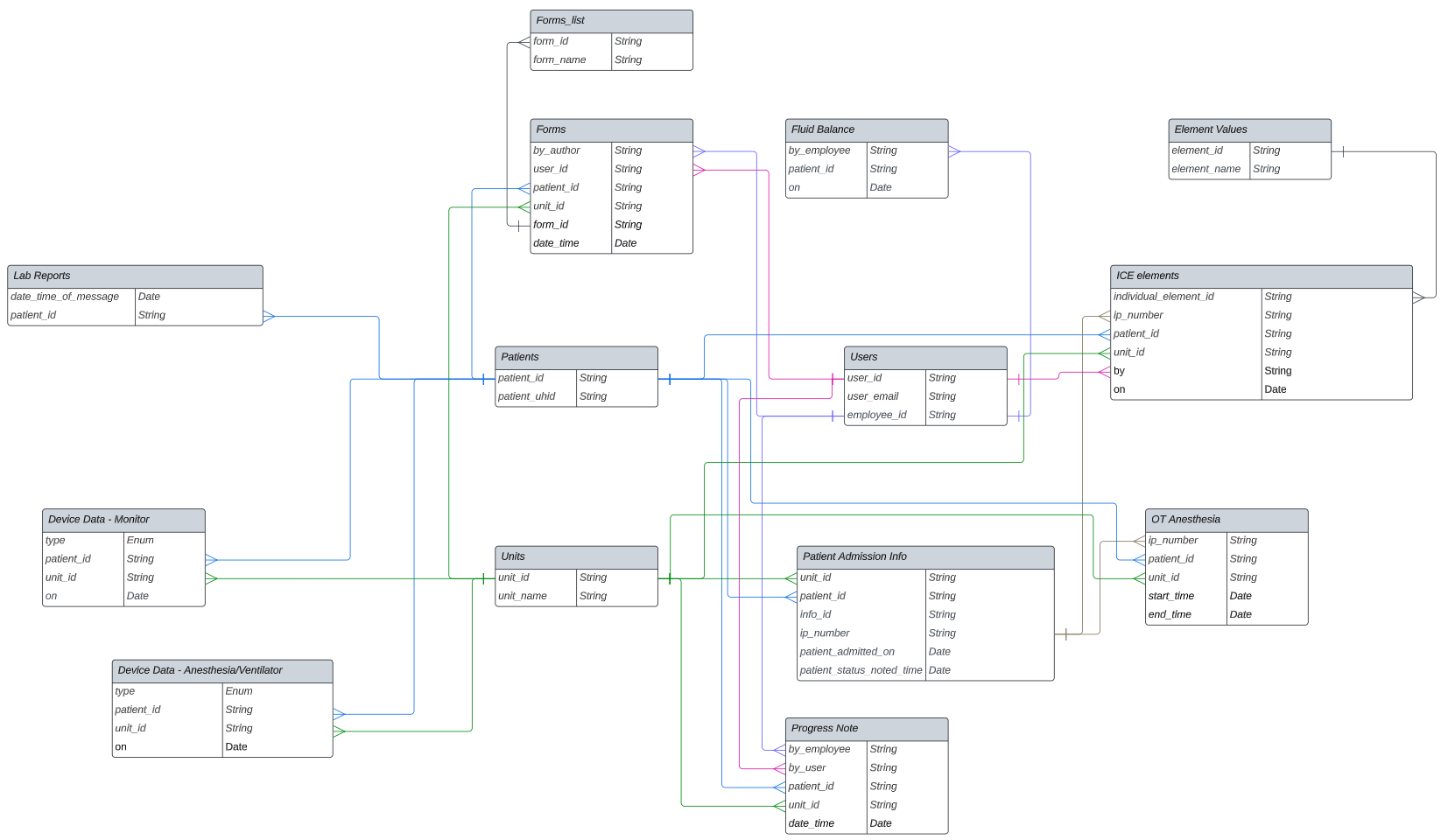
Public Schema